---
title: How to add or update a virtual card transaction reviewer.
description: How to Add or Update a Virtual Card Transaction Reviewer.
---
[Skip to content](https://help.paid.co.uk/knowledge/paid-lite-how-to-add-or-update-a-virtual-card-transaction-reviewer#main-content)
[Customer portal](https://help.paid.co.uk/tickets-view?hsLang=en)

Open main navigation
Close main navigation
- [Customer portal](https://help.paid.co.uk/tickets-view)
Advice and Answers from the Paid team
- There are no suggestions because the search field is empty.
1. [Help Center](https://help.paid.co.uk/knowledge?hsLang=en)
2. [Help for Paid Lite](https://help.paid.co.uk/knowledge/help-for-paid-lite?hsLang=en)
3. [Manage Virtual Cards](https://help.paid.co.uk/knowledge/help-for-paid-lite?hsLang=en#manage-virtual-cards)
April 29, 2026
# How to add or update a virtual card transaction reviewer.
#### **How to Add or Update a Virtual Card Transaction Reviewer.**
You must have administrator privileges to update user settings. If you don’t have access, please contact your company’s administrator.
#### **Purpose:** Assigning a **transaction reviewer** ensures that virtual card purchases are reviewed and approved for compliance, accuracy, and policy adherence. This can be for all amounts or for a purchase over a specific amount; eg purchases over £500. Reviewers may be managers, finance staff, or delegated users.
1\) Log onto your account, which will take you to the dashboard;
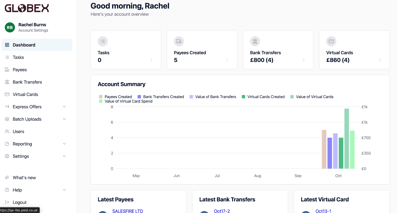
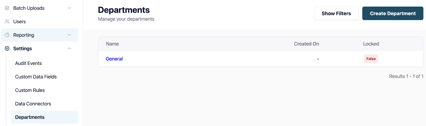
#### 2) From the dashboard please go into ‘Settings’ from the menu on the left hand side, from this dropdown go to 'Departments' and then click into ‘General'.
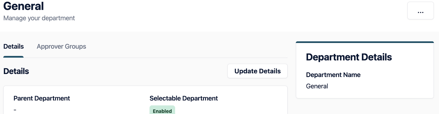
Stay in ‘General’ ‘Details’ as this is the area that is used as the default settings. Scroll down to add ‘Virtual Card Transaction Reviewer’;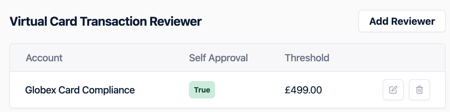
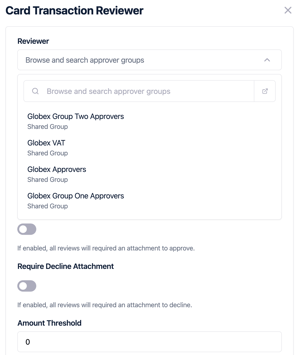
3\) Select ‘Virtual Card Transaction Reviewer’, a pop out will appear on the right hand side of the screen. You can add a Transaction Reviewer by selecting an Approval Group from the dropdown.
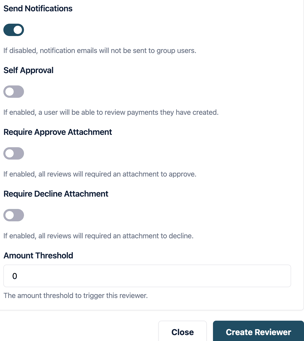
4\) Once you have added the reviewer, for an amount/threshold eg purchases over £500. You will need to populate the other settings. -Nb 'Self Approval' is a segregation of duties, it allows reviewers to approve their own transactions. Once you have done this you need to click ‘Create Reviewer’;
- [Help for Suppliers](https://help.paid.co.uk/knowledge/help-for-suppliers?hsLang=en#main-content)
- [About Paid for Suppliers](https://help.paid.co.uk/knowledge/help-for-suppliers?hsLang=en#about-paid-for-suppliers)
- [Account Details](https://help.paid.co.uk/knowledge/help-for-suppliers?hsLang=en#account-details)
- [Documents](https://help.paid.co.uk/knowledge/help-for-suppliers?hsLang=en#documents)
- [Payments](https://help.paid.co.uk/knowledge/help-for-suppliers?hsLang=en#payments)
- [Work](https://help.paid.co.uk/knowledge/help-for-suppliers?hsLang=en#work)
- [Help for Buyers](https://help.paid.co.uk/knowledge/help-for-buyers?hsLang=en)
- [Help for Paid Lite](https://help.paid.co.uk/knowledge/help-for-paid-lite?hsLang=en#main-content)
- [Manage Payees](https://help.paid.co.uk/knowledge/help-for-paid-lite?hsLang=en#manage-payees)
- [Manage Bank Transfers](https://help.paid.co.uk/knowledge/help-for-paid-lite?hsLang=en#manage-bank-transfers)
- [Manage Virtual Cards](https://help.paid.co.uk/knowledge/help-for-paid-lite?hsLang=en#manage-virtual-cards)
- [User Management](https://help.paid.co.uk/knowledge/help-for-paid-lite?hsLang=en#user-management)
- [Administration](https://help.paid.co.uk/knowledge/help-for-paid-lite?hsLang=en#administration)
- [Teams and Slack Notifications](https://help.paid.co.uk/knowledge/help-for-paid-lite?hsLang=en#teams-and-slack-notifications)
- [Authentication](https://help.paid.co.uk/knowledge/help-for-paid-lite?hsLang=en#authentication)
- [Reports](https://help.paid.co.uk/knowledge/help-for-paid-lite?hsLang=en#reports)
- [ID Verification](https://help.paid.co.uk/knowledge/help-for-paid-lite?hsLang=en#id-verification)
- [Road Map](https://help.paid.co.uk/knowledge/help-for-paid-lite?hsLang=en#road-map)
- [Legal Aspects](https://help.paid.co.uk/knowledge/help-for-paid-lite?hsLang=en#legal-aspects)
- [Express Payments](https://help.paid.co.uk/knowledge/help-for-paid-lite?hsLang=en#express-payments)
- [Accessing Support](https://help.paid.co.uk/knowledge/help-for-paid-lite?hsLang=en#accessing-support)
- [Legal Aspects](https://help.paid.co.uk/knowledge/legal-aspects?hsLang=en)
[](https://paid.co.uk/)
Paid Help Center
Copyright © 2025, Paid Technology Ltd.