---
title: How to add custom data fields to a bank transfer.
description: How to Add Custom Data Fields to a Bank Transfer
---
[Skip to content](https://help.paid.co.uk/knowledge/paid-lite-how-to-add-custom-data-fields-to-a-bank-transfer#main-content)
[Customer portal](https://help.paid.co.uk/tickets-view?hsLang=en)

Open main navigation
Close main navigation
- [Customer portal](https://help.paid.co.uk/tickets-view)
Advice and Answers from the Paid team
- There are no suggestions because the search field is empty.
1. [Help Center](https://help.paid.co.uk/knowledge?hsLang=en)
2. [Help for Paid Lite](https://help.paid.co.uk/knowledge/help-for-paid-lite?hsLang=en)
3. [Manage Bank Transfers](https://help.paid.co.uk/knowledge/help-for-paid-lite?hsLang=en#manage-bank-transfers)
November 11, 2025
# How to add custom data fields to a bank transfer.
#### You must have administrator privileges to update user settings. If you don’t have access, please contact your company’s Super Admin.
**What are Custom Data Fields?**
They collect important context or compliance information during transfer creation.Custom data fields are user-defined, extra fields that store additional information about a data object, going beyond the standard or built-in fields. They allow for more specific data collection and organisation, such as if you would use the supplier again.
1\) Log onto your account, which will take you to the dashboard;
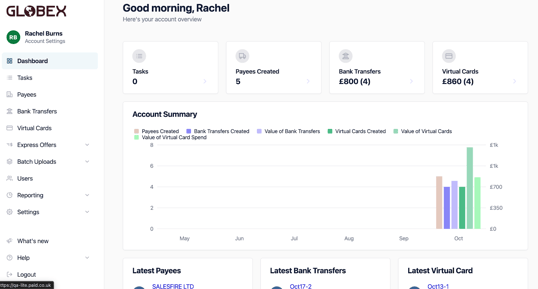
#### 2) From the dashboard please go into ‘Settings’ from the menu on the left hand side, from this dropdown go to Custom Data Fields;
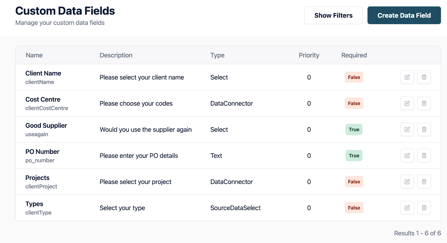
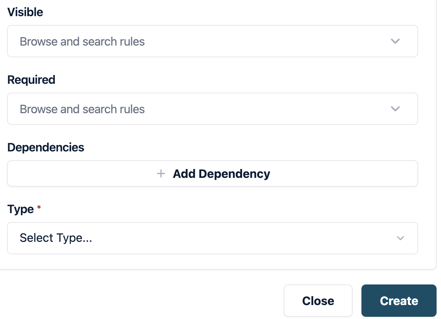
3\) Select Create Data Field and populate the settings;
**FAQs**
**What does Report Key mean?** It can also refer to a specific type of report in certain contexts, such as a "Will use supplier again".
**Priority** -The higher the number the lower down in the list will appear.
**Visible** -Always or Never (Or you can add a Custom Rule that will allow you to set the situation it is shown).
**Type** - Choose: Text Field, Dropdown, Date Picker, Currency, Checkbox, etc
**Required? -** Choose whether this field must be filled to submit the transfer.
**Dependencies** - This could be a Clients Name, Cost Center, Good Supplier, PO #.
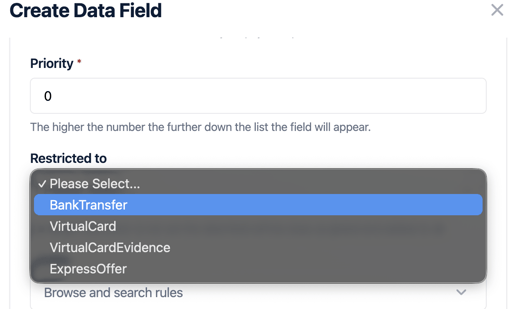
4\) For Custom Fields for Bank Transactions, you need to remember to select it, in ‘Required To”;
5\) Once complete click on ‘Create’ which will save your new settings.
- [Help for Suppliers](https://help.paid.co.uk/knowledge/help-for-suppliers?hsLang=en#main-content)
- [About Paid for Suppliers](https://help.paid.co.uk/knowledge/help-for-suppliers?hsLang=en#about-paid-for-suppliers)
- [Account Details](https://help.paid.co.uk/knowledge/help-for-suppliers?hsLang=en#account-details)
- [Documents](https://help.paid.co.uk/knowledge/help-for-suppliers?hsLang=en#documents)
- [Payments](https://help.paid.co.uk/knowledge/help-for-suppliers?hsLang=en#payments)
- [Work](https://help.paid.co.uk/knowledge/help-for-suppliers?hsLang=en#work)
- [Help for Buyers](https://help.paid.co.uk/knowledge/help-for-buyers?hsLang=en)
- [Help for Paid Lite](https://help.paid.co.uk/knowledge/help-for-paid-lite?hsLang=en#main-content)
- [Manage Payees](https://help.paid.co.uk/knowledge/help-for-paid-lite?hsLang=en#manage-payees)
- [Manage Bank Transfers](https://help.paid.co.uk/knowledge/help-for-paid-lite?hsLang=en#manage-bank-transfers)
- [Manage Virtual Cards](https://help.paid.co.uk/knowledge/help-for-paid-lite?hsLang=en#manage-virtual-cards)
- [User Management](https://help.paid.co.uk/knowledge/help-for-paid-lite?hsLang=en#user-management)
- [Administration](https://help.paid.co.uk/knowledge/help-for-paid-lite?hsLang=en#administration)
- [Teams and Slack Notifications](https://help.paid.co.uk/knowledge/help-for-paid-lite?hsLang=en#teams-and-slack-notifications)
- [Authentication](https://help.paid.co.uk/knowledge/help-for-paid-lite?hsLang=en#authentication)
- [Reports](https://help.paid.co.uk/knowledge/help-for-paid-lite?hsLang=en#reports)
- [ID Verification](https://help.paid.co.uk/knowledge/help-for-paid-lite?hsLang=en#id-verification)
- [Road Map](https://help.paid.co.uk/knowledge/help-for-paid-lite?hsLang=en#road-map)
- [Legal Aspects](https://help.paid.co.uk/knowledge/help-for-paid-lite?hsLang=en#legal-aspects)
- [Express Payments](https://help.paid.co.uk/knowledge/help-for-paid-lite?hsLang=en#express-payments)
- [Accessing Support](https://help.paid.co.uk/knowledge/help-for-paid-lite?hsLang=en#accessing-support)
- [Legal Aspects](https://help.paid.co.uk/knowledge/legal-aspects?hsLang=en)
[](https://paid.co.uk/)
Paid Help Center
Copyright © 2025, Paid Technology Ltd.