
This guide assumes you have the correct administrator privileges, if you do not please contact your companies ‘Super Admin’.
Please Note; If you would like a ‘default’ department that other departments revert back to or a shared point of view.
Select ‘General’ and populate this department first, with the spend band and approvers. This will mean that should you not populate other departments, they will revert to the settings in General.
General —> Parent Department —> Child Department.
What is a Parent Department?
A parent department is the holder of the budget which controls the Spend Bands and Approvals for Child Departments.
What is a Child Department?
A Child Department could also be known as a sub department that refers back to the Parent.
1. Using the menu on the left hand side select settings and from there select ‘Departments’ from the drop down.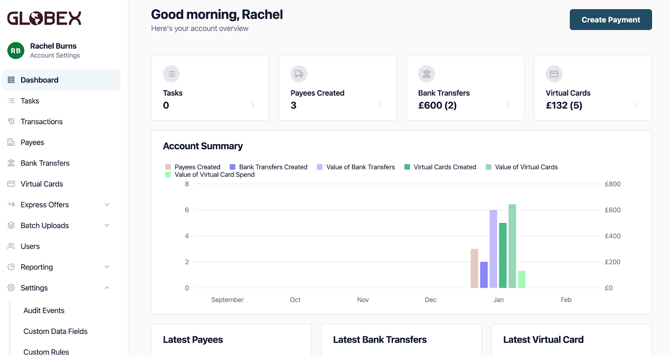
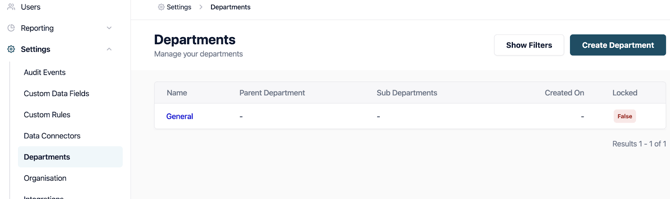
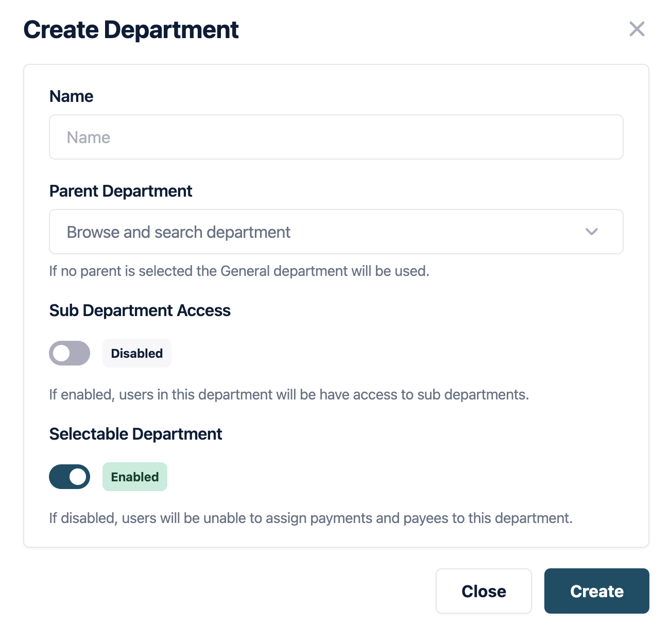
4. Once it is created it will show in the list of Departments, you will need to select into the department you have just created.
5. From the top tabs you will be required to populate them;
- Members
- Approval Groups
- Approvers
- Spend Band → This will need to be populated with users.